
OverCUE User Guide
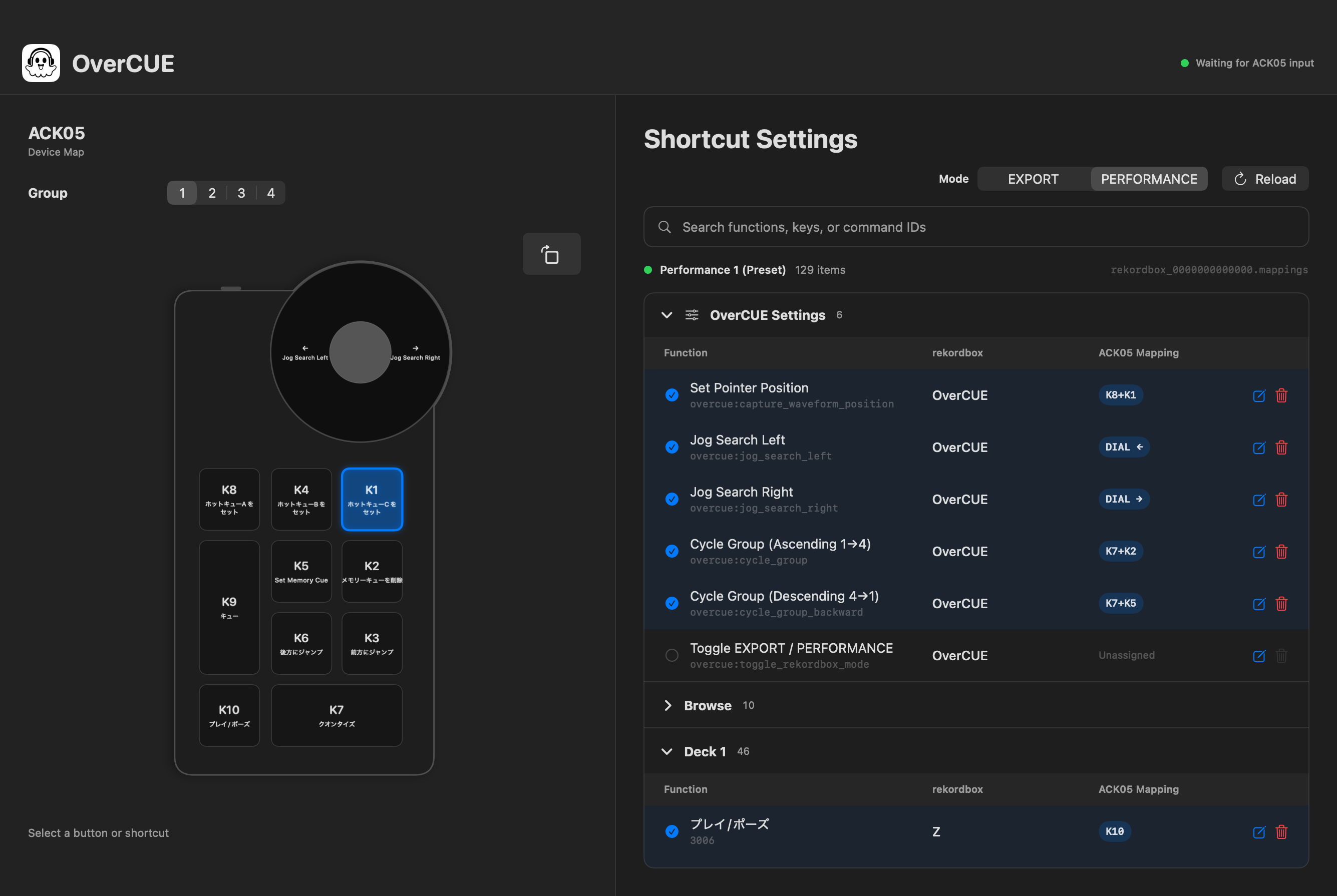
OverCUE is a resident macOS app that turns the XPPen ACK05 dial and ten keys into cue-preparation controls for rekordbox. It uses mouse and keyboard output that works with the rekordbox Free plan.
Support OverCUE
If OverCUE makes cue preparation easier, you can support its continued development, maintenance, and translations.
Requirements
- macOS 13 Ventura or later
- Apple silicon or Intel Mac
- XPPen ACK05 Wireless Shortcut Remote
- rekordbox 7
Installation
- Extract the ZIP archive.
- Move
OverCUE.appto Applications. - Try to open OverCUE once so that macOS displays its warning.
- Open System Settings → Privacy & Security.
- In Security, click Open Anyway for OverCUE.
- Confirm by clicking Open.
Do not disable Gatekeeper or remove quarantine attributes with xattr. You can verify the archive with the SHA256SUMS.txt attached to the Release.
shasum -a 256 OverCUE-v0.1.1-macos-universal.zip
First-time setup
OverCUE uses these macOS permissions:
- Input Monitoring: receives ACK05 key and dial input
- Accessibility: sends keyboard and mouse input to rekordbox
Follow the first-launch guide to grant both permissions to OverCUE, then quit and reopen the app. If XPPenPenTablet consumes ACK05 input, quit it. Reconnecting the ACK05 before restarting OverCUE may also help.
Basic use
- Start rekordbox.
- Connect the ACK05 and launch OverCUE.
- Select an OverCUE group and EXPORT or PERFORMANCE mode.
- To use waveform control, place the pointer over the enlarged waveform and press
K8+K1to save its location. - Bring rekordbox to the front and operate the ACK05.
Keyboard and mouse output is enabled only while rekordbox is frontmost. Closing the window leaves OverCUE running from the 👻 menu-bar icon.
Groups and modes
| Group | Default mode | Target |
|---|---|---|
| 1 | PERFORMANCE | Deck 1 |
| 2 | PERFORMANCE | Deck 2 |
| 3 | EXPORT | Deck 1 |
| 4 | EXPORT | Available for custom mappings |
Each group remembers its last EXPORT or PERFORMANCE mode. Group and mode state stay synchronized between the GUI, ACK05, CLI bridge, and menu bar.
The waveform position captured with K8+K1 is also stored independently for each group. Switching groups activates the position last saved for that group.
Default key map
| Input | Action |
|---|---|
| K1 | Hot Cue C |
| K2 | Delete Memory Cue |
| K3 | Jump backward (accelerating hold repeat) |
| K4 | Hot Cue B |
| K5 | Set Memory Cue |
| K6 | Jump forward (accelerating hold repeat) |
| K7 | Quantize ON/OFF |
| K8 | Hot Cue A |
| K9 | Cue (plays while held) |
| K10 | Play/Pause |
| Dial left/right | Jog Search left/right |
| K8+K1 | Capture waveform position |
| K7+K8/K4/K1 | Delete Hot Cue A/B/C |
| K7+K3/K6 | Next/previous Memory Cue |
| K7+K2 | Cycle groups forward |
| K7+K5 | Cycle groups backward |
| K7+dial left/right | Pitch Bend −/+ |
Editing mappings
Click the edit button in the shortcut list, then operate an ACK05 key, any-size key chord, dial direction, or held-key plus dial input.
- OverCUE asks before replacing an occupied input.
- It rejects chords that conflict with hold actions and explains the conflict.
- Clicking a key or dial side in the device diagram selects and scrolls to its shortcut.
- List or device selection is blue; live hardware input is green.
- rekordbox function names use the language stored in its key-mapping file.
Settings are stored at:
~/Library/Application Support/OverCUE/config.json
Troubleshooting
OverCUE cannot open the ACK05
- Quit XPPenPenTablet.
- Disconnect and reconnect the ACK05.
- Check Input Monitoring permission for OverCUE.
- Quit and reopen OverCUE.
rekordbox does not respond
- Bring rekordbox to the front.
- Check Accessibility permission for OverCUE.
- Confirm that rekordbox has a shortcut assigned to the target function.
- Check the current EXPORT/PERFORMANCE mode and group.
It stopped working after an update
Because the app is ad-hoc signed, replacing it may require granting Input Monitoring and Accessibility again. Remove the old OverCUE entry in System Settings and add the new app.
Privacy and security
The distributed ZIP has not been notarized or scanned by Apple. Verify its checksum and inspect the public source before use.
License and trademarks
OverCUE is available under the MIT License.
OverCUE is an independent, unofficial project. It is not affiliated with or endorsed by XPPen, AlphaTheta, or rekordbox. Product names and trademarks belong to their respective owners.
See the GitHub repository for implementation details.